


Scanmaster Mounting Spots.


Thread Starter
Registered User
Joined: Jan 2005
Posts: 2,592
From: N Falmouth MA
Scanmaster Mounting Spots.
Like it says.. Where'd you mount your Scanmaster? I've got some mods lined up for next spring. Trying to make everything work in the interior as far as system monitoring. Any cool spots? Top of the steering collumn?
In the Camaro's, I've seen it mounted in place of the ASR switch, on the LT1's, usually mounted in place of the vent on the top of the dash.
In the Camaro's, I've seen it mounted in place of the ASR switch, on the LT1's, usually mounted in place of the vent on the top of the dash.

Registered User
Joined: Apr 2005
Posts: 1,830
From: Colorado Springs, CO
Re: Scanmaster Mounting Spots.
I mounted mine in the middle air vent in my 96 LT1. It just looks like it belongs there. I get people saying it looks stock all the time. Here is a pic and the install guide i used. I dont know where you could mount yours since you dont have the same dash and vent. I have seen some people mount them above the steering column and it looks ok there, but not as good as the air vent. I have also seen some people mount it in the recesed area above the speedo and tach.
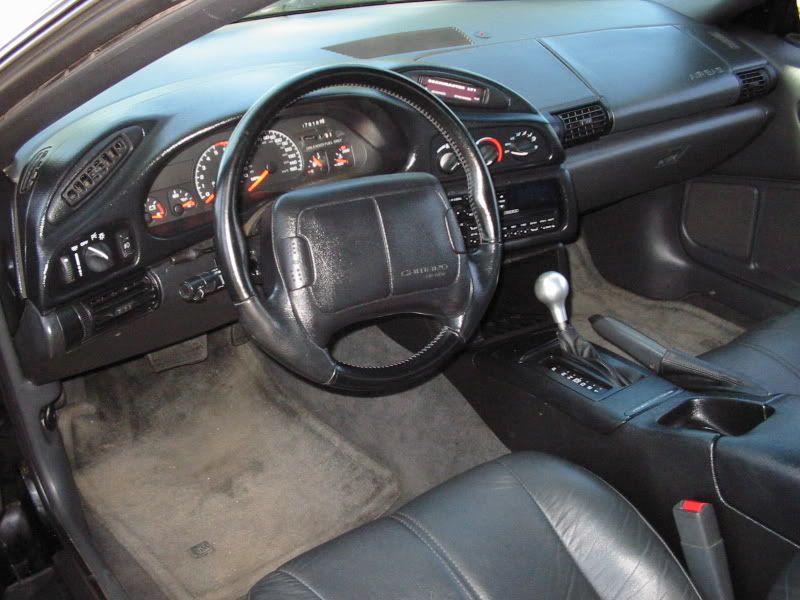
Here is the install guide for the air vent.
http://www.bfranker.badz28.com/fbody/scanmaster.htm
Here is the install guide for above the speedo and tach.
http://www.projecttransam.com/projects4.asp
Here is the install guide for the air vent.
http://www.bfranker.badz28.com/fbody/scanmaster.htm
Here is the install guide for above the speedo and tach.
http://www.projecttransam.com/projects4.asp
Last edited by LT1 POWR; Sep 10, 2006 at 02:55 AM.
Thread Starter
Registered User
Joined: Jan 2005
Posts: 2,592
From: N Falmouth MA
Re: Scanmaster Mounting Spots.
Ahh.. My gears r turnin.... GOt an idea. I don't use my top/ center vents... I could try to rig something up in there... Try to keep it round like the stockers..
Could stick a shift light in there like I wanted to. But I don't want it obvious or rigged.... Man I wish I had a WS6, those vents are purfect. Or the LT1...
Could stick a shift light in there like I wanted to. But I don't want it obvious or rigged.... Man I wish I had a WS6, those vents are purfect. Or the LT1...

Administrator
Joined: Nov 1998
Posts: 71,120
From: Hell was full so they sent me to NJ
Re: Scanmaster Mounting Spots.


Registered User
Joined: Apr 2005
Posts: 1,830
From: Colorado Springs, CO
Re: Scanmaster Mounting Spots.
Here is a wonderful writeup brought to you be Injuneer.
http://members.aol.com/InjuneerZZ/ScanMast.htm
You can find them used on the board all the time or new here.
http://www.speedspecialty.com/store/...uct=scanmaster
http://members.aol.com/InjuneerZZ/ScanMast.htm
You can find them used on the board all the time or new here.
http://www.speedspecialty.com/store/...uct=scanmaster

Registered User
Joined: Dec 2005
Posts: 106
From: Western NY
Re: Scanmaster Mounting Spots.
yea, mine is located in the air vent where LT1 POWR's is. I am still trying to figure this gadget out. I just got injuneer's user manual, but I am not getting any readouts at all. When the car is on, i don't see diagnostics going. I just hear it go beep beep when I turn the car off, so what gives?
Registered User
Joined: Apr 2005
Posts: 1,830
From: Colorado Springs, CO
Re: Scanmaster Mounting Spots.
Originally Posted by BMWKillR
yea, mine is located in the air vent where LT1 POWR's is. I am still trying to figure this gadget out. I just got injuneer's user manual, but I am not getting any readouts at all. When the car is on, i don't see diagnostics going. I just hear it go beep beep when I turn the car off, so what gives?
http://www.bfranker.badz28.com/fbody/scan23.JPG
Just make sure your wireing is correct.
Is it getting any power?

Registered User
Joined: May 2006
Posts: 559
From: Pothole, Ohio
Re: Scanmaster Mounting Spots.
Originally Posted by Injuneer
I just bought one from Full Throttle last week....
Registered User
Joined: Dec 2005
Posts: 106
From: Western NY
Re: Scanmaster Mounting Spots.
Originally Posted by LT1 POWR
I dont think they make noises. Well mine doesnt i dont think. Go through and check all of your wireing. Did you use the wires for the ALDL port to hook it up as seen here.
http://www.bfranker.badz28.com/fbody/scan23.JPG
Just make sure your wireing is correct.
Is it getting any power?
http://www.bfranker.badz28.com/fbody/scan23.JPG
Just make sure your wireing is correct.
Is it getting any power?
Registered User
Joined: Apr 2005
Posts: 1,830
From: Colorado Springs, CO
Re: Scanmaster Mounting Spots.
Originally Posted by BMWKillR
I pulled it out a little from the dash ans it has 1 white wire running to it. I don't recall ever seeing a cluster of connectors like in your picture. As for the power part, it definitely beeps I know that, so it must be getting power of some kind. I did not install it, it came w/the car. IDK if it was working at the time I bought the car I didn't know what it even did.
Go through this install and make sure all the wires are makeing good connections to the correct location. I know one of my wires came loose and the scanmaster stopped working.
http://www.bfranker.badz28.com/fbody/scanmaster.htm
Administrator
Joined: Nov 1998
Posts: 71,120
From: Hell was full so they sent me to NJ
Re: Scanmaster Mounting Spots.
Originally Posted by 01Z
I'm looking at your picture Fred; how is it attached? thanks.
I just bought one from Full Throttle last week....
I just bought one from Full Throttle last week....
From my online writeup:
INSTALLATION:
The ScanMaster is supplied with a 4-wire bundle (Note: I have heard that the latest models are missing the green wire). The wires have stripped ends, and that's it - no plug, no connector.
Red - +12V power supply. It does not have to be "switched" power. The ScanMaster will shut itself down on loss of signal. I used the wire that goes to the cigarette lighter.
Black - Ground. Connect this wire under any good screw or bolt that is securely mounted in the metal chassis.
White - Data wire. Connect to the "data" terminal in the ALDL connector. In the 94's this it the lower right hand pin. On all models, this is a light tan wire.
Green - Not used.
Some thoughts on the wiring details:
You need to provide for a "disconnect" on the white data wire. It must be disconnected if you attempt to attach any other device to the ALDL connector, like a laptop cable for LT1_Edit or other programming system, a cable for a Hypertech Power Programmer, or a dealer scan tool. The ScanMaster uses bi-directional communication, and the signals from the ScanMaster will interfere with the signals from the programmers or scanners. A small switch or a "plug" will suffice.
If you put a "plug" in the other lines, it allows the unit to be removed and used on another vehicle without cutting the wires.
The white wire does not have to be connected directly to the pin on the ALDL connector. I spliced into the wire on the back of the connector, and added a small switch.
The ScanMaster is supplied with a 4-wire bundle (Note: I have heard that the latest models are missing the green wire). The wires have stripped ends, and that's it - no plug, no connector.
Red - +12V power supply. It does not have to be "switched" power. The ScanMaster will shut itself down on loss of signal. I used the wire that goes to the cigarette lighter.
Black - Ground. Connect this wire under any good screw or bolt that is securely mounted in the metal chassis.
White - Data wire. Connect to the "data" terminal in the ALDL connector. In the 94's this it the lower right hand pin. On all models, this is a light tan wire.
Green - Not used.
Some thoughts on the wiring details:
You need to provide for a "disconnect" on the white data wire. It must be disconnected if you attempt to attach any other device to the ALDL connector, like a laptop cable for LT1_Edit or other programming system, a cable for a Hypertech Power Programmer, or a dealer scan tool. The ScanMaster uses bi-directional communication, and the signals from the ScanMaster will interfere with the signals from the programmers or scanners. A small switch or a "plug" will suffice.
If you put a "plug" in the other lines, it allows the unit to be removed and used on another vehicle without cutting the wires.
The white wire does not have to be connected directly to the pin on the ALDL connector. I spliced into the wire on the back of the connector, and added a small switch.
Registered User
Joined: May 2006
Posts: 559
From: Pothole, Ohio
Re: Scanmaster Mounting Spots.
Originally Posted by Injuneer
Velcro.
I've never heard mine make any noise at all.
BTW, the instructions say to connect to the "white" wire. You are correct in that it is actually a tan wire. There is a white wire (pin 5 I think) that has a black stripe on it.
Last edited by 01Z; Sep 18, 2006 at 10:40 AM.