


How you can add an aux input/mp3 player without an adapter


Thread Starter
Registered User
Joined: Apr 2001
Posts: 74
From: Rice Lake, WI
How you can add an aux input/mp3 player without an adapter
I've finally decided to switch my 98 Camaro CD unit out for an aftermarket HU, and now I'd like to move it into my Grand Am. Since I don't have to worry about killing it now, I've decided to take it part and try to add an aux input (which isn't even possible with adapters in a 98). I've done something similar to an old head unit before, here's what I've found so far.
The amp seems to be on the main board board, so there isn't an easy way to tap in there like there was on my old head unit. No easy route from the radio, either. However, the CD player is a self-contained unit with a ribbon cable, so audio must be passing over it.
Here's a picture of the bottom of the CD player, with the CD connector circled:

Now, here's a closeup of the connector. I tapped in a couple of leads to a set of powered speakers to locate the wires carrying sound. I've labeled the two audio channels. One is left, the other right, I haven't determined which is which yet. Will need to hook up some car speakers to the standard connector on the back to figure that out.

So it's just a simple matter of splicing into those three wires with a special normally open type jack. This will allow the CD audio to pass through the jack fine when nothing is plugged in. When you plug in a cable into it from your MP3 player or whatever, it physically disconnects the audio to the CD player, and instead passes along the signal from your cable. You will need to have your CD player playing for this to work, even though it's using audio from your MP3 player. I know some of the aftermarket adapters that plug in between the HU and the cd changer work the same way, the changer plays, but it replaces the audio.
A quick search of radio shack.com returns this, 2.99 for a 2-pack:
jack
However, unlike the old HU I modified, I don't think you can easily put a jack into the face of this head unit, since there is a circuit board running behind plate. You can't just drill a hole and stick it through. See here:

So I think the solution would be to run a 6ft+ wire through the back of the HU with a jack at the end you could run into glove box or into the console. The panel mount jack from radio shack isn't really the best for that, but it would work. I'm sure one of the big online electronics suppliers have something better.
So for a couple of bucks and fairly basic electronics knowledge, splicing into three wires, you should be able to an an aux-input to any 98+ camaro HU.
What do you guys think?
The amp seems to be on the main board board, so there isn't an easy way to tap in there like there was on my old head unit. No easy route from the radio, either. However, the CD player is a self-contained unit with a ribbon cable, so audio must be passing over it.
Here's a picture of the bottom of the CD player, with the CD connector circled:
Now, here's a closeup of the connector. I tapped in a couple of leads to a set of powered speakers to locate the wires carrying sound. I've labeled the two audio channels. One is left, the other right, I haven't determined which is which yet. Will need to hook up some car speakers to the standard connector on the back to figure that out.
So it's just a simple matter of splicing into those three wires with a special normally open type jack. This will allow the CD audio to pass through the jack fine when nothing is plugged in. When you plug in a cable into it from your MP3 player or whatever, it physically disconnects the audio to the CD player, and instead passes along the signal from your cable. You will need to have your CD player playing for this to work, even though it's using audio from your MP3 player. I know some of the aftermarket adapters that plug in between the HU and the cd changer work the same way, the changer plays, but it replaces the audio.
A quick search of radio shack.com returns this, 2.99 for a 2-pack:
jack
However, unlike the old HU I modified, I don't think you can easily put a jack into the face of this head unit, since there is a circuit board running behind plate. You can't just drill a hole and stick it through. See here:
So I think the solution would be to run a 6ft+ wire through the back of the HU with a jack at the end you could run into glove box or into the console. The panel mount jack from radio shack isn't really the best for that, but it would work. I'm sure one of the big online electronics suppliers have something better.
So for a couple of bucks and fairly basic electronics knowledge, splicing into three wires, you should be able to an an aux-input to any 98+ camaro HU.
What do you guys think?
Last edited by Jason Novak; Jan 5, 2008 at 01:10 AM.


Registered User
Joined: Feb 2004
Posts: 751
From: Leesburg, VA
I see no reason it wouldn't work. However, have you tried measuring DC offset and "normal" signal amplitude on both audio carrying wires at normal operating conditions while playing CD/radio. Re-routing them to external audio source with different output voltage and impedance can introduce a lot of distortion and can possibly damage an amp or MP3 player. I would use at least a couple of capacitors inline with each channel for better protection. Good luck with your project!
Thread Starter
Registered User
Joined: Apr 2001
Posts: 74
From: Rice Lake, WI
Ok, I've started doing some more work. "Channel 1" in the picture is left, "Channel 2" is right.
I got a jack from radio shack, it's actually part 274-246 link
I tested the left CD channel and it's putting a fraction over 4v when playing CDs. So I cut the left/right channel wires and hooked my MP3 player directly in, and it worked. I didn't check the voltage on my MP3 player, but they must be close since the volume levels were pretty similar between CD and MP3. It also sounded pretty clean. Do you think I need capacitors in this case, and if so, any suggestions?
I think I'm going to try mounting it into the face plate, near the tuning ****. It would be nicer if it was on the other side but I don't think there would be rooom. If it was going back into my camaro maybe I'd run a wire mount it into the console. Not so worried about a clean look in my grand am.
I got a jack from radio shack, it's actually part 274-246 link
I tested the left CD channel and it's putting a fraction over 4v when playing CDs. So I cut the left/right channel wires and hooked my MP3 player directly in, and it worked. I didn't check the voltage on my MP3 player, but they must be close since the volume levels were pretty similar between CD and MP3. It also sounded pretty clean. Do you think I need capacitors in this case, and if so, any suggestions?
I think I'm going to try mounting it into the face plate, near the tuning ****. It would be nicer if it was on the other side but I don't think there would be rooom. If it was going back into my camaro maybe I'd run a wire mount it into the console. Not so worried about a clean look in my grand am.

Thread Starter
Registered User
Joined: Apr 2001
Posts: 74
From: Rice Lake, WI
Ok, more progress.
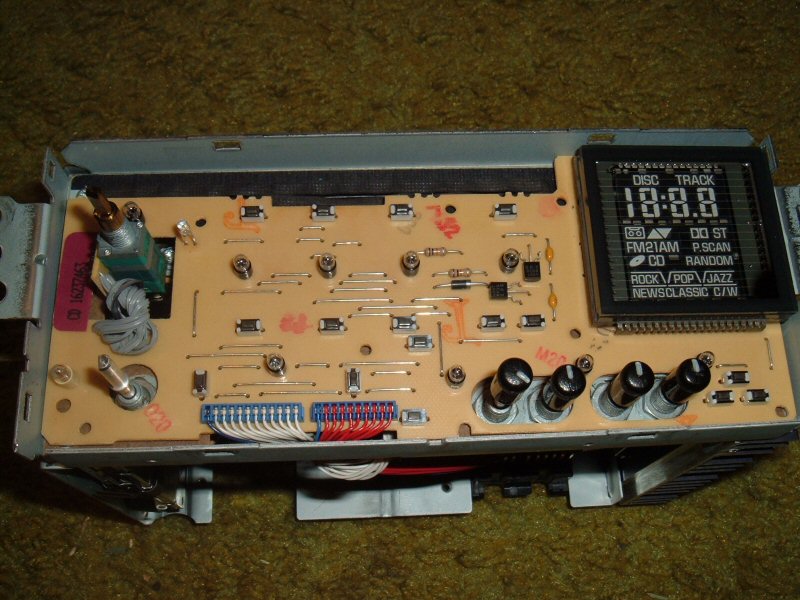
Just because here's a picture of the circuit board behind the face plate. Need to remove some screws and a nut under the volume control to pull off the face.
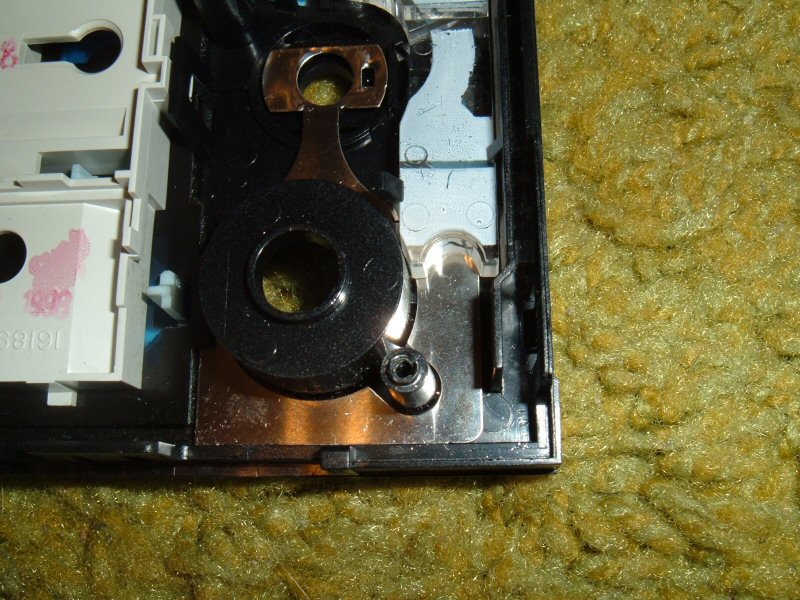
Now here's the backside of the face plate where I plan to put the jack
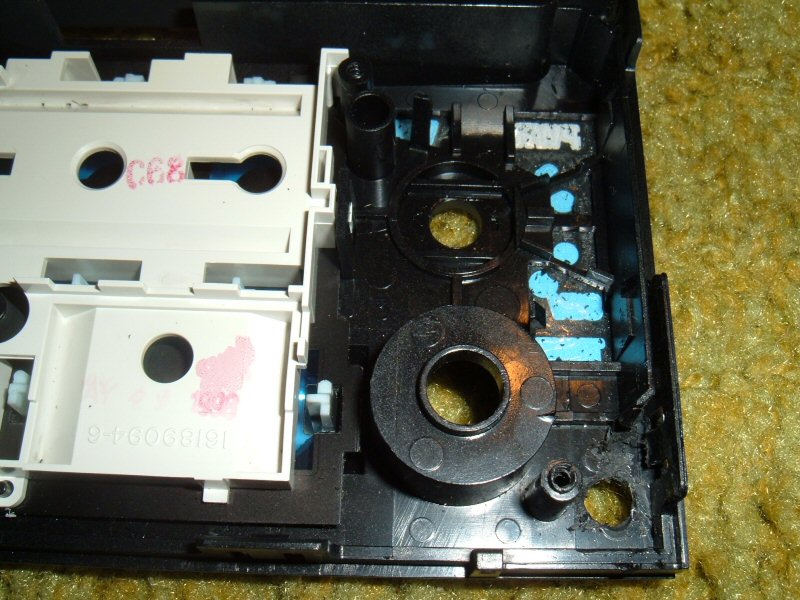
Now I've pulled out the clear plastic and metal piece, and cut out a piece of the side wall and dremeled it smooth. Drilled a little pilot hole from the bottom, and then a 1/4 hole from the front so it won't mess it up.
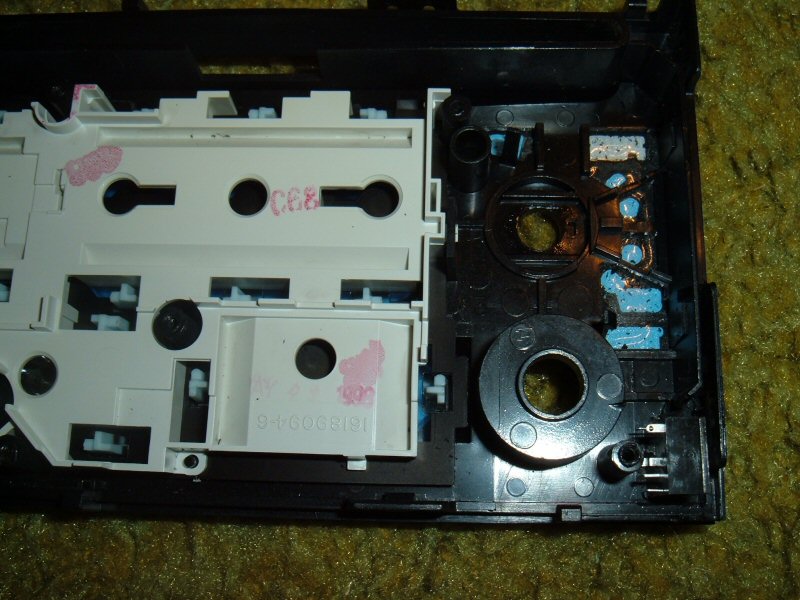
Here's the jack in place. The side is lined up with the remaining inset plastic wall I cut off (it can't go flush or the face plate can't go back on since a metal tab goes in just outside the inner wall), and the bottom flush on the bottom. I didn't think about how much the dash time plate overlays the face plate, but I think I'm okay.
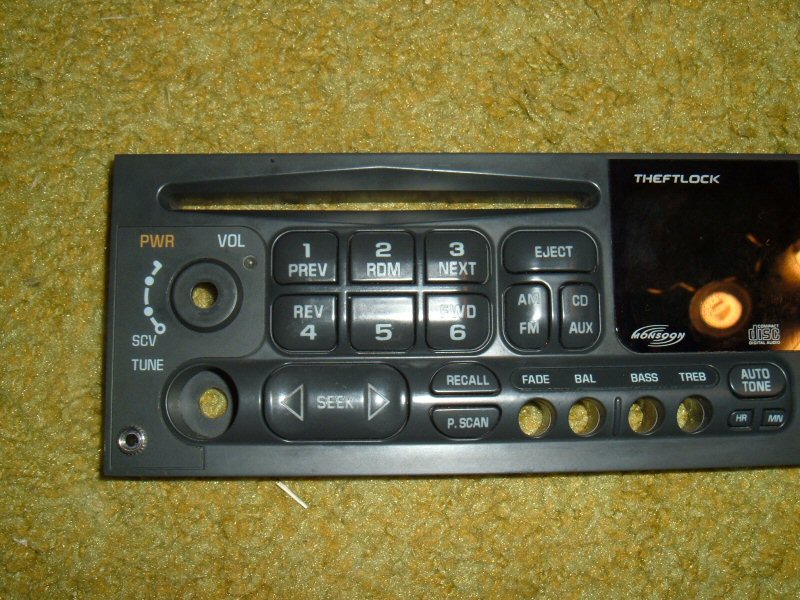
And finally, here's the front with the jack installed. All I should have to do is wire it up now
Just because here's a picture of the circuit board behind the face plate. Need to remove some screws and a nut under the volume control to pull off the face.
Now here's the backside of the face plate where I plan to put the jack
Now I've pulled out the clear plastic and metal piece, and cut out a piece of the side wall and dremeled it smooth. Drilled a little pilot hole from the bottom, and then a 1/4 hole from the front so it won't mess it up.
Here's the jack in place. The side is lined up with the remaining inset plastic wall I cut off (it can't go flush or the face plate can't go back on since a metal tab goes in just outside the inner wall), and the bottom flush on the bottom. I didn't think about how much the dash time plate overlays the face plate, but I think I'm okay.
And finally, here's the front with the jack installed. All I should have to do is wire it up now

Registered User
Joined: Feb 2003
Posts: 447
From: NW Suburbs of Chicago
so is it my understanding that you totally cut the wires and run them all through this jack and basically it lets the cdplayer sound through but when u plug into the jack it disconnects the cdplayer and gives u aux input
Greg
Greg
Thread Starter
Registered User
Joined: Apr 2001
Posts: 74
From: Rice Lake, WI
Well, it's done, and working 
I used some networking cable, I had planned to have use solid colors as circuit board connections, but switched two when I was soldering so you may want to ignore the colors
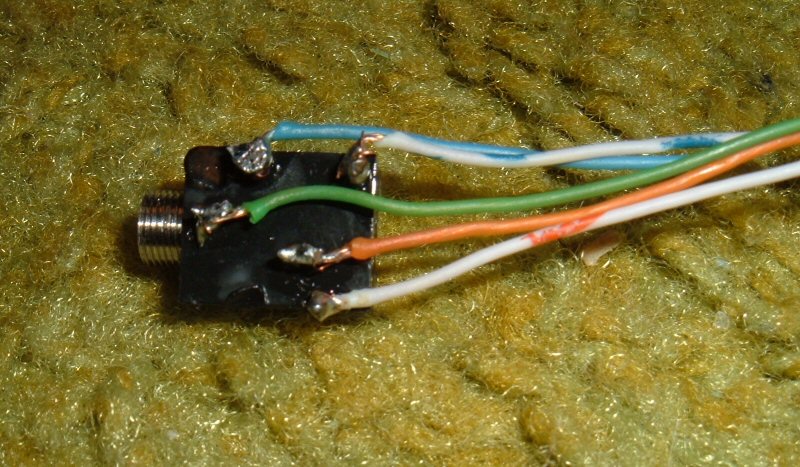
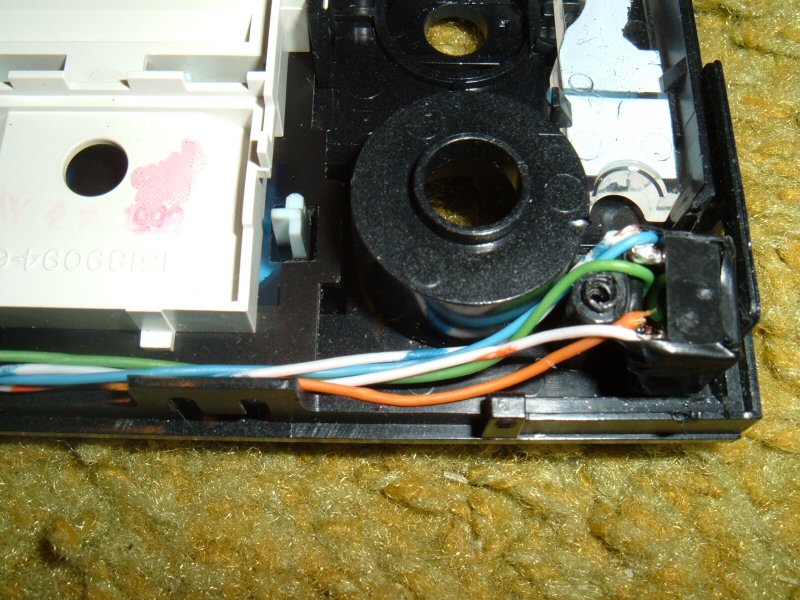
And here are the wires connected in the HU. Connect the ground wire to the metal stereo chassis. Soldered everything and taped it. I put a piece a tape on the bottom of the jack since once connection looked like it may touch the metal case when put back together.

Here's how the jack is wired:

Pin 1 - Ground - stereo chassis
Pin 2 - Left Channel - wire from CD connector on main circuit board
Pin 3 - Left Channel - wire coming from CD player module
Pin 4 - Right Channel - wire coming from CD player module
Pin 5 - Right Channel - wire from CD connector on main circuit board
I'll install it tommorow when it's light out
I used some networking cable, I had planned to have use solid colors as circuit board connections, but switched two when I was soldering so you may want to ignore the colors
And here are the wires connected in the HU. Connect the ground wire to the metal stereo chassis. Soldered everything and taped it. I put a piece a tape on the bottom of the jack since once connection looked like it may touch the metal case when put back together.
Here's how the jack is wired:
Pin 1 - Ground - stereo chassis
Pin 2 - Left Channel - wire from CD connector on main circuit board
Pin 3 - Left Channel - wire coming from CD player module
Pin 4 - Right Channel - wire coming from CD player module
Pin 5 - Right Channel - wire from CD connector on main circuit board
I'll install it tommorow when it's light out
Last edited by Jason Novak; Jan 5, 2008 at 01:11 AM.

Registered User
Joined: Feb 2004
Posts: 1,154
From: VA
I would bet that the black wire on that header is power ground not signal common.
It also doesn't sound like you measured the signal on the audio channels from the CD, so you don't know if the mp3 line out is at an appropriate level for this input.
It also doesn't sound like you measured the signal on the audio channels from the CD, so you don't know if the mp3 line out is at an appropriate level for this input.
Thread Starter
Registered User
Joined: Apr 2001
Posts: 74
From: Rice Lake, WI
When I was testing the CD signal voltage I did use the chassis as a ground since I hadn't spliced into the ground on the CD connector yet. Put both halves of the left signal wire onto one probe and the other on the case. It would be simple to tie it to the case, it sounds pretty good though?
The CD player is putting out a louder signal then the MP3 player, I have to turn it up a little to match the volume level of the CD player, but I suspect you won't really find anything that matches perfectly. The new sony head unit I have in my Camaro now has an aux-input, and I have to turn up the volume more to match the CD volume then I have to on the modifed stock unit.
The CD player is putting out a louder signal then the MP3 player, I have to turn it up a little to match the volume level of the CD player, but I suspect you won't really find anything that matches perfectly. The new sony head unit I have in my Camaro now has an aux-input, and I have to turn up the volume more to match the CD volume then I have to on the modifed stock unit.
Thread Starter
Registered User
Joined: Apr 2001
Posts: 74
From: Rice Lake, WI
I installed it into my grand am and it works great, more volume then I can stand without an amp. I did try it in my Camaro and the jack was a little too far at the edge. I would just fit inside the trim but the slope of the trim would prevent the cable from plugging in a cable. Not sure they're a lot of room to move it over. I'd probably recommend just drilling a hole in the back of the HU and running wires out and putting the connector into the console or something. Taking apart the face and putting in the jack into the front instead took up most of the time doing this and was trickest part.