


Mp3 Ipod player Aux in to factory delco bose less then 10.00!


Thread Starter
Registered User
Joined: May 2009
Posts: 5
Mp3 Ipod player Aux in to factory delco bose less then 10.00!
Hey guys, just finished posting this on LS1 tech, thought you guys might be interested as well, my user name there is 94camroz28lt1. Thanks -Jamie I have alot more images there, i was only aloud to have ten here. Here is a link to LS1techs article http://www.ls1tech.com/forums/stereo...n-10-00-a.html
Use the following info at you own risk, This may work for other radios as well, again at you own risk!
The following is for a factory GM delco Bose cd payer found in 93-96 camaros this one is from a 94 Camaro Z28.
Project time 2- 3 hours.. I could probably do this in less then an hour, now that I have done it, but this is more realistic.
Cost under $10.00
You will need:
-6mm I think was the size fore the radio case bolts??
-10mm
-7mm socket
-1/4" extension and ratchet
-Phillips screw driver
-several small flat screw drivers
-Solder, and soldering gun
-small gauge wire
-3.5mm computer stereo chassis mount Get this from radio shack, or a computer electronics store
Optional:
charged 12 volt battery, spare speaker, wire, 15 amp fuse and holder, toggle switch, spare radio plug or really small spade connectors
this is really only necessary if you wish to check your work before you put it all together.
Warning always be cautious when working around air bags, they can still go off even after the battery is removed.
Step 1 make sure you know you theft loc code, then disconnect both the negative, and positive battery cables
Step 2 remove the fuse cover driver side of dash remove the two Phillips screws, and the two 7mm screws holding the knee bolster on, remove the panel enough to unplug the defroster, then completely remove the panel. Next open the glove box door remove the three 7mm screws one below the passenger a/c vent, and the other to further down. Finish by removing the remaining two 7mm screws on the drivers side of the radio trim panel, then remove the panel.
Step 3 remove the two 7mm screws on the driver side of the radio, and the 10mm nut on the passenger side, then slide the radio out, squeeze the radio plug, and remove it, then remove the antenna plug, finish by removing the radio.
Warning your body can carry enough static electricity to short out circuit boards, and small electronic components, work on a static free surface, use a static bracelet, or try and always have a part of your body touching the radio case. definitely do not work on carpet or a plastic table cloth! Also the small capacitors in the radio can carry enough voltage to be harmful to you, even after the battery is disconnected!
Step 4 with the radio on a desk, or bench remove all of the case screws except the two right ones on either side of the antenna plug, then flip the radio upside down, use a small flat bladed screw driver to "unlock" the plastic tabs of the front panel (shown in the picture). Then tilt the Cd player up enough to to remove the one remaining screw with a long extension or nut driver, remove the bottom cover, and unplug the cd player by using two screw drivers to help slide the plugs out, they should only go back in one way, so no need to mark them. Set the cd player aside and out of the way.
ipoddelcoradiomod032.jpg?t=1264567484
ipoddelcoradiomod023.jpg?t=1264567484
ipoddelcoradiomod029.jpg?t=1264567484
ipoddelcoradiomod030.jpg?t=1264567484
Step 5 This is the most difficult part of the entire project! Use three small flat screw drivers to depress the small black plastic plugs that hold then front panel on see the following pictures, you can then remove the from panel, and you can slide the wires out of there loom and unplug them from the front panel to get it out of you way, again they should only go back on one way but, you can mark them to be sure!
ipoddelcoradiomod017.jpg?t=1264567484
ipoddelcoradiomod016.jpg?t=1264567484
ipoddelcoradiomod014.jpg?t=1264567484
ipoddelcoradiomod019.jpg?t=1264567484
Step 6 flip the remaining radio/receiver piece over, remove the two gold screws if you haven't already, then unclip the metal top, and remove it.
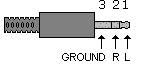
Step 7 You can now add the mini jack to the back of the stereo, by pocking out the whole that is covered by the factory decal, remove enough of the decal to provide a good ground. You can now solder the wires from the main receiver pins to the mini jack, they are pin 9 Left audio, pin 10 right audio, shown in the following pictures. Note if your mini jack is not labeled like mine then you can always check it with a old male stereo cable with wires stripped, you can then plug it in, and check it with a multi meter.
Here you can see the two spots LCH RCH , that you can tap into anywhere along the way just use a multi meter to trace it, I found the most practical spot to tap into it, is in the main receiver
Step 8 At this point you can either resemble everything, or if you are unsure of you work, or doing this with a different radio, you can bench test it, by plugging everything back in, they don't have to be screwed back together, but just make sure they are all touching each other enough to ground, or it will not work properly. Facing the radio from the back side the Grey plug top right hand side center pins a speaker left and right, the bottom row far left is 12 volts constant, the one right beside it is 12 volt switched, and the far right bottom row is ground. Make sure to fuse hot wires, and use a toggle switch. Note the volume will need to be at almost max to hear a faint sound as this is before it goes through the factory amp.
You will need to have a cd playing in order to use the Aux port you just added, any cd will work the Ipod or Mp3 player will over power it, but it is better to use a custom silence cd to eliminate other music being played between tracks, or a sound spike when you remove the ipod/mp3 player. Here is more pictures, and a link to burn a custom cd of 5 min of silence, you only need this one track, it will keep continuously playing to infinity.

link to 5 min of silence
http://www.mediafire.com/?yed2rvjaenh
Step 9 resemble everything reverse of removal, make sure to plug in what ever stereo cable you want before sliding the radio back in, you can the route it to the center console, or were ever! I like the jack in the back because it doesn't damage the front of the radio at all, and it can easily be restored back to stock. This mod sounds crystal clear, and no bump, will cause any kind of skipping, enjoy, hope this helps. You can still use the factory cd player as well as the radio! Let me know if you have any questions! -Jamie
Use the following info at you own risk, This may work for other radios as well, again at you own risk!
The following is for a factory GM delco Bose cd payer found in 93-96 camaros this one is from a 94 Camaro Z28.
Project time 2- 3 hours.. I could probably do this in less then an hour, now that I have done it, but this is more realistic.
Cost under $10.00
You will need:
-6mm I think was the size fore the radio case bolts??
-10mm
-7mm socket
-1/4" extension and ratchet
-Phillips screw driver
-several small flat screw drivers
-Solder, and soldering gun
-small gauge wire
-3.5mm computer stereo chassis mount Get this from radio shack, or a computer electronics store
Optional:
charged 12 volt battery, spare speaker, wire, 15 amp fuse and holder, toggle switch, spare radio plug or really small spade connectors
this is really only necessary if you wish to check your work before you put it all together.
Warning always be cautious when working around air bags, they can still go off even after the battery is removed.
Step 1 make sure you know you theft loc code, then disconnect both the negative, and positive battery cables
Step 2 remove the fuse cover driver side of dash remove the two Phillips screws, and the two 7mm screws holding the knee bolster on, remove the panel enough to unplug the defroster, then completely remove the panel. Next open the glove box door remove the three 7mm screws one below the passenger a/c vent, and the other to further down. Finish by removing the remaining two 7mm screws on the drivers side of the radio trim panel, then remove the panel.
Step 3 remove the two 7mm screws on the driver side of the radio, and the 10mm nut on the passenger side, then slide the radio out, squeeze the radio plug, and remove it, then remove the antenna plug, finish by removing the radio.
Warning your body can carry enough static electricity to short out circuit boards, and small electronic components, work on a static free surface, use a static bracelet, or try and always have a part of your body touching the radio case. definitely do not work on carpet or a plastic table cloth! Also the small capacitors in the radio can carry enough voltage to be harmful to you, even after the battery is disconnected!
Step 4 with the radio on a desk, or bench remove all of the case screws except the two right ones on either side of the antenna plug, then flip the radio upside down, use a small flat bladed screw driver to "unlock" the plastic tabs of the front panel (shown in the picture). Then tilt the Cd player up enough to to remove the one remaining screw with a long extension or nut driver, remove the bottom cover, and unplug the cd player by using two screw drivers to help slide the plugs out, they should only go back in one way, so no need to mark them. Set the cd player aside and out of the way.
ipoddelcoradiomod032.jpg?t=1264567484
ipoddelcoradiomod023.jpg?t=1264567484
ipoddelcoradiomod029.jpg?t=1264567484
ipoddelcoradiomod030.jpg?t=1264567484
Step 5 This is the most difficult part of the entire project! Use three small flat screw drivers to depress the small black plastic plugs that hold then front panel on see the following pictures, you can then remove the from panel, and you can slide the wires out of there loom and unplug them from the front panel to get it out of you way, again they should only go back on one way but, you can mark them to be sure!
ipoddelcoradiomod017.jpg?t=1264567484
ipoddelcoradiomod016.jpg?t=1264567484
ipoddelcoradiomod014.jpg?t=1264567484
ipoddelcoradiomod019.jpg?t=1264567484
Step 6 flip the remaining radio/receiver piece over, remove the two gold screws if you haven't already, then unclip the metal top, and remove it.
Step 7 You can now add the mini jack to the back of the stereo, by pocking out the whole that is covered by the factory decal, remove enough of the decal to provide a good ground. You can now solder the wires from the main receiver pins to the mini jack, they are pin 9 Left audio, pin 10 right audio, shown in the following pictures. Note if your mini jack is not labeled like mine then you can always check it with a old male stereo cable with wires stripped, you can then plug it in, and check it with a multi meter.
Here you can see the two spots LCH RCH , that you can tap into anywhere along the way just use a multi meter to trace it, I found the most practical spot to tap into it, is in the main receiver
Step 8 At this point you can either resemble everything, or if you are unsure of you work, or doing this with a different radio, you can bench test it, by plugging everything back in, they don't have to be screwed back together, but just make sure they are all touching each other enough to ground, or it will not work properly. Facing the radio from the back side the Grey plug top right hand side center pins a speaker left and right, the bottom row far left is 12 volts constant, the one right beside it is 12 volt switched, and the far right bottom row is ground. Make sure to fuse hot wires, and use a toggle switch. Note the volume will need to be at almost max to hear a faint sound as this is before it goes through the factory amp.
You will need to have a cd playing in order to use the Aux port you just added, any cd will work the Ipod or Mp3 player will over power it, but it is better to use a custom silence cd to eliminate other music being played between tracks, or a sound spike when you remove the ipod/mp3 player. Here is more pictures, and a link to burn a custom cd of 5 min of silence, you only need this one track, it will keep continuously playing to infinity.
link to 5 min of silence
http://www.mediafire.com/?yed2rvjaenh
Step 9 resemble everything reverse of removal, make sure to plug in what ever stereo cable you want before sliding the radio back in, you can the route it to the center console, or were ever! I like the jack in the back because it doesn't damage the front of the radio at all, and it can easily be restored back to stock. This mod sounds crystal clear, and no bump, will cause any kind of skipping, enjoy, hope this helps. You can still use the factory cd player as well as the radio! Let me know if you have any questions! -Jamie










Thread
Thread Starter
Forum
Replies
Last Post
jackpawt883
LT1 Based Engine Tech
7
Sep 10, 2015 08:53 PM
ChrisFrez
2010 - 2015 Camaro News, Sightings, Pictures, and Multimedia
0
Sep 9, 2015 06:52 AM